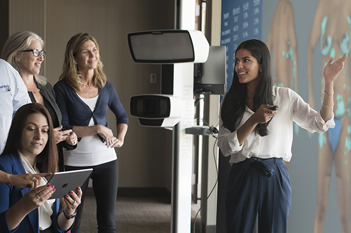
 assessment
- automated measurements
- rhinoplasty
- chin augmentation
- injectables
- lifts
- facial contouring
- skin resurfacing
Assess, Educate & Simulate Outcomes


- assessment
- automated measurements
- patient education
- augmentation
- mastopexy
- revision
- fat grafting

- tummy tuck
- liposuction
- buttock augmentation
- cellulite treatment
- measure volume change
FACE Sculptor®
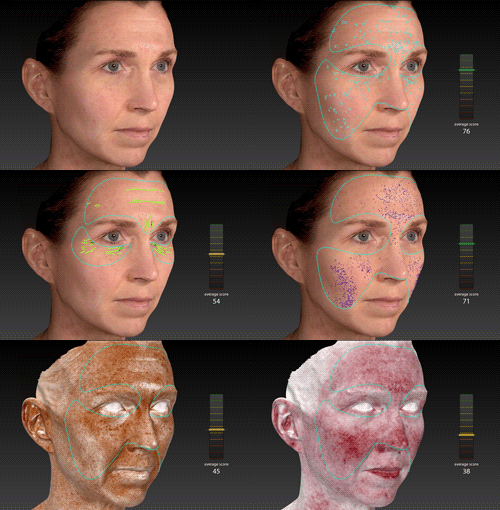
3D skin analysis identifies, analyzes, and displays results for Spots, Wrinkles, Texture, Pores, Brown Spots, and Red Areas. Graphs depict the calculated score for each feature.
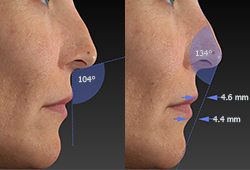
Automated measurements, some only possible with 3D technology, help your patients understand their current condition.
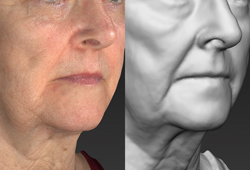
Gray mode reveals contours without color distraction, presenting opportunities for corrective procedures.
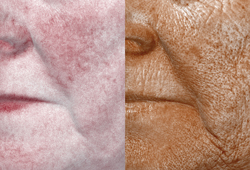
RBX® technology separates the unique color signatures of Red and Brown skin components for unequaled visualization of skin conditions.
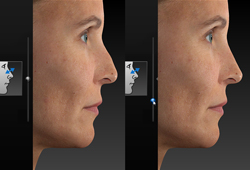
Simulate realistic 3D results with intuitive interface including slider-based adjustments for instantaneous three-dimensional rhinoplasty simulation.
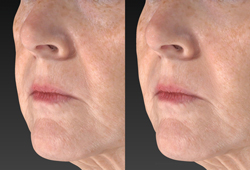
Contouring Simulate removing or adding volume.
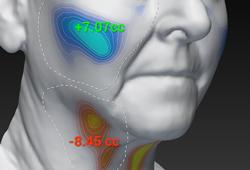
Volume difference Visualize the degree of contour change with a color distance map and one-click volume difference measurement.
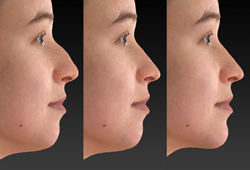
Complementary procedures Help your patient decide on the best possible treatment plan by showing the difference between the likely outcome with single or multiple procedures.
BREAST Sculptor®
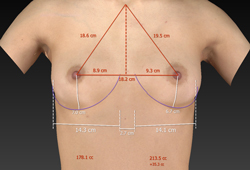
Automated measurements, some only possible with 3D technology, help your patients understand their current condition.
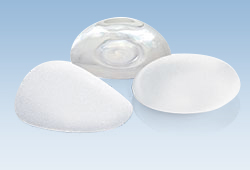
Select breast implants from the product catalogs you normally use.
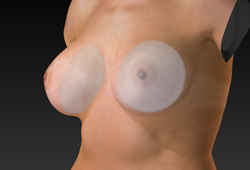
Sculptor's dynamic soft tissue modeling technology generates actual 3D models of the implants you select and calculates a realistic outcome based upon gravity, the shape and placement of the selected implant.
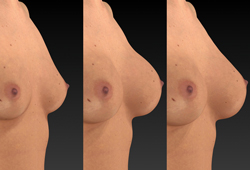
Compare multiple implant scenarios with different size, style and shape options.
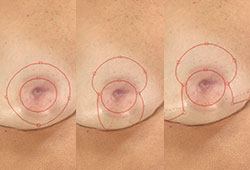
The Mastopexy interface in Breast Sculptor® closely models the way you perform surgery, including adjustable incisions used to simulate the excising of skin.
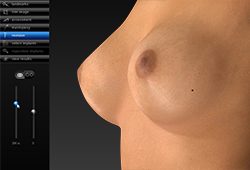
Revision provides sliders to simulate replacement of current implants with new larger implants. Adjust volume independently for each breast, or linked for matching changes.

The Patient Education module provides a series of checklist-style customizable disclaimers with relevant visual tools and measurements to streamline your informed consent process.
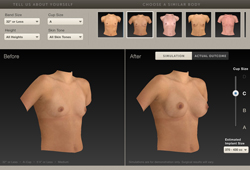
SculptMyDream® doctor locator (www.sculptmydream.com), lists your practice so that women who are exploring breast augmentation surgery can find you quickly and easily.
BODY Sculptor®
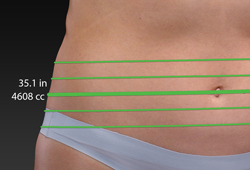
Circumferential measurements Automated circumference and volume measurements for body contouring, only possible with 3D technology and 360° imaging.
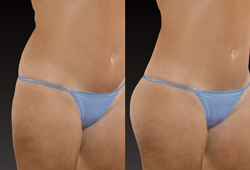
Body Contouring Simulate removing or adding volume.
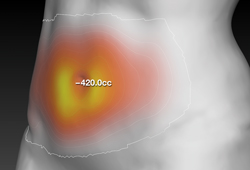
Volume difference Visualize the degree of contour change with a color distance map and one-click volume difference measurement.
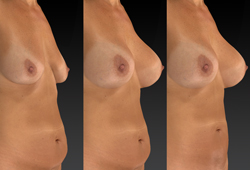
Complementary procedures Help your patient decide on the best possible treatment plan by showing the difference between the likely outcome with single or multiple procedures.
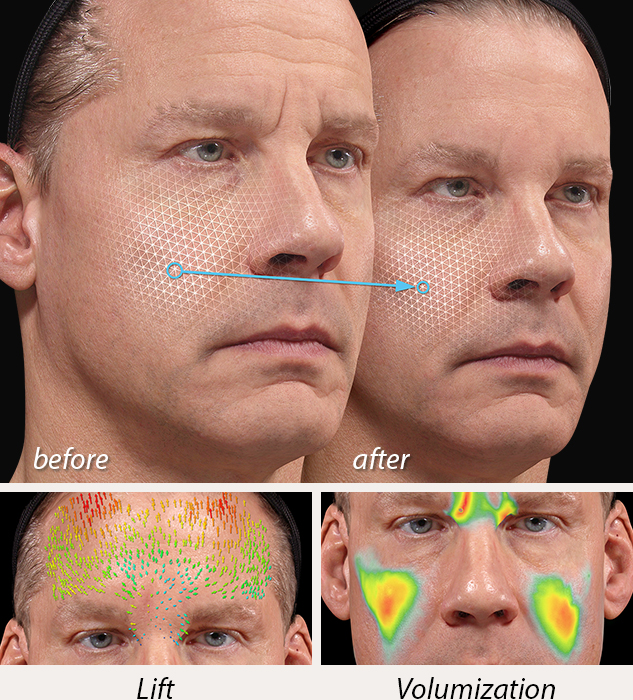
Automated Markerless Tracking provides a dynamic assessment of skin surface changes
- Canfield's proprietary Markerless Tracking technology is a quantitative approach to soft tissue assessment that characterizes the degree of stretch, compression, lift and volumization.
- Dense image to image correspondence enables fine-scale 3D biomechanical analysis.
- Skin surfaces are automatically aligned, tracked and mapped.
- Vector arrows provide a precise indication of the direction and magnitude of skin movement, which is ideal for encouraging future treatments.
- Physician review of outcomes helps refine treatment techniques.
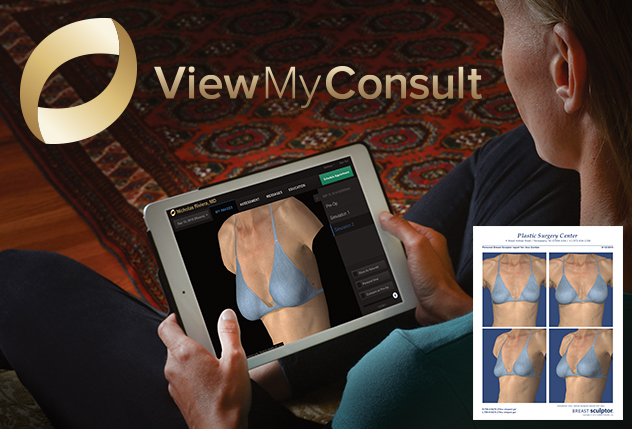
ViewMyConsult® web portal helps you stay connected to your patients as they consider the possibilities of aesthetic procedures. By accessing a secure, password-protected web portal, patients can view their 3D pictures in the privacy of their own home. Your patient can take it all home with ViewMyConsult and personalized printed reports.
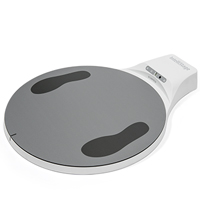
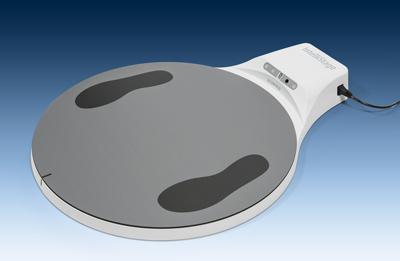 | Optional IntelliStage® allows for fast and easy 360° capture |
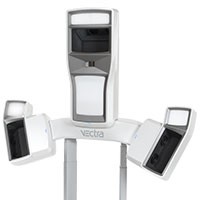
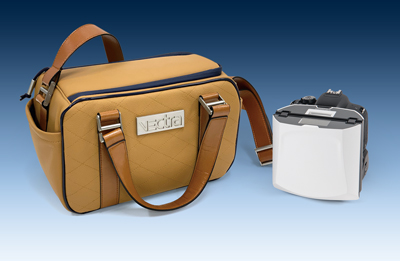 | Custom case included. VECTRA H2 flash folds for transport. |
“
"VECTRA has become an invaluable consultation tool in my practice. The ability to visually simulate potential outcomes helps patients better understand their options, improves communication, and allows them to move forward with greater confidence in their surgical decisions."
”
 Jonathan Ross Berman, MD, FACS,Berman Plastic Surgery
“
The highest available standard in medical photography and skin analysis tools, as provided by Canfield Scientific, has been the foundation of my cosmetic dermatology practice from its start.
”
 Dr. Patricia Ogilvie,Skin Concept
 “
I am so glad that I was introduced to the magnificent VECTRA. I have been utilizing VECTRA technology for 3 years, and it has made a huge upgrade to my clinic. VECTRA is extremely helpful during the consultation - both for operative planning as well as for educating patients. This leads to a more clear and reliable doctor-patient relationship.
”
 Volney Pitombo, MD,Volney PitomboCirurgia Plastica
Related Products
Tech Specs & Requirements
Capture system specifications
- Capture Volume
- Face capture: 320mm (H) x 180mm (W) x 200mm (D)
- Body capture: 700mm (H) x 410mm (W) x 400mm (D)
- 2.0 milliseconds capture time
- Stereophotogrammetry technology
- 3D Resolution (triangle edge length)
- Face capture: 1.2mm
- Body capture: 3.5mm
- Multiple image stitching capability
- On-board modular, intelligent flash unit
- Dual Ranging lights for easy patient positioning (Face and Body)
- SD Memory Card
- (4) Batteries and (2) chargers
- USB Cable
- Soft carrying case
- Computer (optional)
- Printer (optional)
Software
- VECTRA Capture Module
- VECTRA Analysis Module
- Mirror® 2D Tools
- Face Sculptor® (optional)
- Skin Analysis Sculptor (optional)
- Breast Sculptor® (optional)
- Body Sculptor® (optional)
System Power
- 100-120V AC, 50/60 Hz, 15va or
- 220-240V AC, 50/60 Hz, 20va
Windows computer requirements
- Operating system:
- Windows 11 Professional 64 bit
- NOT SUPPORTED: Windows Home Edition
- Processor: Intel Core i7 (or i9/Ultra 9, 13th Gen or higher recommended)
- System memory (RAM): 16 GB minimum (32GB or higher recommended)
- Minimum 1 GB available disk space for installing application
- 1 TB available disk space recommended for data
- Graphics card:
- 4 GB dedicated memory minimum (or higher)
- Dedicated NVidia or AMD cards (NVidia Highly Recommended)
- Driver: latest available
- 3.0 or later Open GL
- USB Ports: 1 dedicated USB-C port
- Display: 1920 x 1080 (FHD) minimum; 3840 x 2400 (4K) maximum (max 200% scaling)
- Microsoft Security Essentials anti-virus software recommended
- Wired printers (recommended for speed)
- 1 Gbps wired LAN connectivity for networking - remote DB access not supported over Wi-Fi
Windows File Server / Network Guidelines (not supplied - minimum recommendations)
- Windows Server 2019 64-bit or 2022 64-bit
- Microsoft SQL Server 2019 or 2022 (Express edition is installed by default)
- 2.2 GHz or faster processor (2023 or newer recommended)
- 16GB system memory (RAM) (or higher recommended)
- 1 Gbps wired LAN connectivity (Wi-Fi not supported)
- 1 Terabyte HDD recommended. Space required is dependent upon patient volume, camera used, and settings.
- RAID 1 - NOT SUPPORTED
- Regularly scheduled backups are highly recommended
Mac computer requirements
- Mac hardware: 2020 or newer
- Operating system: macOS Sequoia and Tahoe
- Processor: Apple M1 (or higher)
- System memory (RAM): 16 GB (or higher)
- Minimum 2 GB available disk space for installing application
- Minimum 500 GB available disk space recommended for data (1TB or higher recommended for capturing to local database)
- Graphics card: M1 (or higher)
- USB Ports: 1 USB-C port required
- Display: 13-inches or larger with resolution of 1920 x 1080 or greater
- Optional: 1 Gbps wired LAN connectivity for networking (remote DB access not supported over Wi-Fi)
- Optional: SD Card reader for SD Card capture mode
Mac server requirements
- Windows or Mac based server that meets Minimum Computer Recommendation
- macOS:
- MySQL version 8.0.33
- Windows OS:
- Windows Server 2019 64-bit or 2022 64-bit
- Microsoft SQL Server 2019 or 2022 (Express edition is installed by default)
- 1 Gbps wired LAN connectivity (Remote Database access over Wi-Fi not supported)
- 1 Terabyte HDD recommended. Space required is dependent upon patient volume, camera used, and settings.
- RAID 1 - NOT SUPPORTED
- Regularly scheduled backups are highly recommended
Mirror Mobile iPad® App - Purchased Separately
- Minimum support of 802.11n or later protocol by the intra-office Wi-Fi router
- Requires iPad capable of running the current version of iOS
- Mirror desktop software running on Windows OS is required to support Mirror iPad app database
Notes
- We do not support using a server class OS as a workstation.
- WAN connectivity is NOT supported. 1Gbps connection required.
- A minimum of 1 Gbps network speed is required to access the storage location of the live copy of the data (10 Gbps recommended). Wi-Fi is not supported for workstation connectivity
- Maximum 25ms latency required to the storage location of the live copy of the data
- Anti-virus exceptions must be put in place to avoid any latency
- Server class OS not supported as a workstation
- SSD Storage is highly recommended
- Cloud storage (Azure, AWS, Google Cloud, Etc.) is not supported for storing data, but can be used for backup purposes
- RAID 1 is not supported
- The Machines/PC/Server where the Canfield services are running must have a static IP address
- In a networked environment, the services(s) need to run with a dedicated service account where the password does not expire, and it has access to the DB and the images folder
Frequently Asked Questions
Why should I have Breast Sculptor in my practice?
Breast Sculptor improves doctor-patient communication by allowing them to view and discuss realistic and personal simulations of breast augmentation procedures;
- using a 3D image of the patient's own body and 3D models of saline and gel implants.
- eliminating the need for time-consuming and patient-unfriendly processes such as reviewing photographs and stuffing bras.
Surgeons have differentiated their practices by offering Breast Sculptor consultations, and it has brought print and broadcast media attention to surgeons across the country. At the same time, these surgeons have seen a substantial increase in conversion rates for breast augmentation procedures.
What facial procedures are possible?
Face Sculptor currently provides the ability to model in 3D several facial procedures, including;
- Rhinoplasty
- Chin augmentation
- Chin liposuction
- Injectables (fillers and toxins)
- Face lifts
- Lip augmentation
Is Face Sculptor easy to use?
Face Sculptor software is very easy to use. Graphical instructions, easy adjustment sliders and intuitive software guide the user to ensure that realistic surgical models are easily created. Face Sculptor's convenient viewing tools makes it easy to show your patient the likely outcome from any angle, as well as superimposed over the pre-op image or side-by-side.
What types of facial adjustments are possible?
Several types of adjustments are provided to enable simulating most surgical and non-surgical procedures. Constrained and unconstrained tools are used to adjust the shape of the face, such as modifying the bridge of the nose, adding filler to the malar pad region and liposuction of the chin and neck. Additional skin texture tools are used to adjust surface changes, such as adding toxins, filling in nasolabial folds and skin resurfacing.
Can I model more than one procedure on the same image?
Yes. A patient initially interested in modifications to only one portion of their face, for instance their nose, can also be shown the effects of changes made to a complementary portion of the face such as their chin.
Can I use the modeled images as a reference during surgery?
2D images, saved from any angle of the 3D image, can be copied into a printable report for use during surgery. It is also possible to load the 3D image onto a PC located in the operating room, enabling the surgeon to use an electronic copy of the 3D image as a reference.
Do I need special lighting in my room to capture accurate images?
No. The VECTRA system includes lighting designed specifically for clinical photography, producing images without shadows and with color that matches the patient's own skin tones. No additional lighting is necessary
Is the quality of the patient's 3D image good enough to show on my large-panel display?
Yes. Canfield's 3D Mirror Imaging system provides high resolution images, suitable for displaying on large format displays in the surgeon's consultation rooms or office. Even the pores on the patient's skin are displayed
What is included with Face Sculptor?
Face Sculptor software comes as part of a complete turn-key solution suitable for professional Face Sculptor consultations. This solution includes the VECTRA High Resolution 3D Capture System, 3D Mirror software, computer, and one day of installation and training.
Can I run Face Sculptor on the computer in my consultation room?
Yes. Face Sculptor may be run from a computer other than the one provided with your turn-key system. The high quality Face Sculptor images may require additional graphic card performance. Contact Canfield Imaging Systems to see if your computer is adequate for running Face Sculptor. If not, we can make recommendations for computers or upgrades best suited for this purpose.
Why should I have Face Sculptor in my practice?
Face Sculptor will enhance your patient's consultation experience, helping them visualize their hopes and expectations by;
- communicating the possibilities as you demonstrate surgical and non-surgical facial procedures on a 3D image of your patient's face, while arriving at a shared understanding of treatment objectives.
- exploring the combined effects of complementary procedures, such as rhinoplasty and chin augmentation, improving your patient's satisfaction, while also increasing the amount of procedures you perform.
This will increase conversion rates, help ensure post-surgery satisfaction and generate more patient referrals.
Where can I purchase Breast Sculptor?
Breast Sculptor and 3D Mirror systems are manufactured in the United States by Canfield Imaging Systems, Fairfield, NJ. To purchase a system in the US, obtain more information, or identify a distributor in your country, contact us at +1.973.276.0336 or by email at info@canfieldsci.com.
Is Breast Sculptor easy to use?
Breast Sculptor software is very easy to use. Its wizard-like interface guides the user through three quick and easy steps to create a realistic outcome.
- Place landmarks on the patient's 3D image
- Select saline or gel implants from your choice of manufacturer
- Review the outcome with your patient
Breast Sculptor's convenient viewing tools makes it easy to show your patient the likely outcome from any angle, as well as superimposed over the pre-op image or side-by-side. You may also elect to have Breast Sculptor generate a custom report with pre-op photos, breast measurements and implant selection information.
What are the landmarks used for?
Primarily, the landmarks are used to enable Breast Sculptor to provide key measurements used for implant selection. However, the landmarks are also used to help the software identify where the patient's chest wall is located for purposes of creating the modeled outcome.
What implant parameters are selectable?
Breast Sculptor provides the ability to select the implant brand, fill type (gel or saline), profile, shell (smooth or textured), volume, and in the case of saline implants the amount of fill added. The manufacture's catalog number is provided. You may also select different implant parameters for each breast to help address breast asymmetry.
Is breast asymmetry identified?
All patients exhibit some level of asymmetry. In some cases, the level of asymmetry is large enough that it should be addressed during augmentation surgery. Breast Sculptor conveniently provides an indication of asymmetry by showing the difference in volume between the two breasts. The user can then make adjustments to the implant parameters, including volume and profile changes to deal with the asymmetry.
Are you able to complete outcomes with ptotic breasts?
Breast Sculptor includes the ability to model the lifting of the breast in conjunction with an augmentation. The process is done directly after the implants are modeled and before the final outcome is created. This enables the user to provide a comparison to the patient of what the augmentation would look like with or without the lift.
Can I make adjustments to the outcome after it is modeled?
Yes. The software provides the ability for the surgeon to make easy adjustments to ensure the simulation matches what the surgeon considers the expected outcome to be.
Is the quality of the patient's 3D image good enough to show on my large panel display?
Yes. Canfield's VECTRA 3D Imaging system provides high resolution images, suitable for displaying on the largest displays. Even the pores on the patient's skin are displayed.
What is included with Breast Sculptor?
Breast Sculptor software comes as part of a complete turn-key solution suitable for professional Breast Sculptor consultations. This solution includes the VECTRA III High Resolution 3D Capture System, 3D Mirror software, computer, and one day of installation and training.
Can I run Breast Sculptor on the computer in my consultation room?
Yes. Breast Sculptor can be run from a computer other than the one provided with your turn-key system. Of course, the high quality Breast Sculptor images require additional graphic card performance. Contact Canfield Imaging Systems to see if your computer is adequate for running Breast Sculptor. If not, we can make recommendations for computers or upgrades best suited for this purpose.
Where can I purchase Face Sculptor?
Face Sculptor and 3D Mirror systems are manufactured in the United States by Canfield Imaging Systems, Parsippany, NJ. To purchase a system in the US, obtain more information, or identify a distributor in your country, contact us at +1.973.434.1201 or by email at info@canfieldsci.com.
Canfield Care® Support & Training
Canfield Care includes:
- Unlimited expert technical assistance
- Remote diagnostic service
- Advanced hardware exchange
- Marketing support
- Remote training
- Unlimited Webinars ($250 value per webinar)
- ViewMyConsult® client portal
- Your Canfield purchase includes 1 year of complimentary Canfield Care support and training.
- 1-year limited warranty on Canon rechargeable Lithium-Ion batteries
- Extended Canfield Care is available
- On-site training: Additional on-site training by Canfield is available, contact us for pricing and additional information.